
When you search Google for a quick recipe or room makeover idea, a Pinterest link shows up again. You tap it, you like it, and then a login pop-up blocks it out. Sounds familiar, right? This guide is for you if you’ve ever wondered, “What is the correct way to use Pinterest?”
I’ve kept all this relatively straightforward and user friendly for newbies. You will learn how to use Pinterest step by step, how to obtain a Pinterest video download link and how to save Pinterest videos using a Pinterest video downloader HD tool on your laptop or phone. Let’s get started.
What Is Pinterest and Why Is It So Popular?
Pinterest is a website where you can discover ideas and save them for later. Imagine a large online noticeboard! Whether you’re looking for a new haircut, a recipe, a study guide, travel ideas or home decor, Pinterest will bring you a ton of images and videos to motivate you.
It is also huge. In its Q3 2026 results, Pinterest revealed that it serves around 661 million users globally each month. Oh, and it’s 100% free to use.
How to Use Pinterest Step by Step
Pinterest isn’t as hard to use as it seems. You will be comfortable in about 10 minutes by following these 6 steps.
Step 1: Create Your Free Account
Install the Pinterest app from the Google Play Store or the App Store, or go to pinterest.com in your browser. You can register using your email, or proceed with Google, Facebook or Apple. You will then be asked to select a few topics. Select the ones you really like, as this helps your home feed show better suggestions from day one.
Step 2: Search for Ideas
Click on the search bar and enter your desired text. Be specific. Try using “simple college outfits for girls” as an alternative to “outfits”. Pinterest is a search engine, and the more specific the words, the better the results. Many of the Pins you’ll find are videos, so it will be useful to know how to download them later.
Step 3: Save Pins to Boards
If you like what you see, click the Save button. Pinterest will ask which board you would like to use. A board is simply a folder for your ideas. You can make a new one such as “Diwali Decor” or “Healthy Dinner Ideas” and keep things tidy! If you want a board to stay private, turn it into a secret board from the settings.
Step 4: Follow Creators and Boards
You’ll begin to see new Pins in your feed as you follow the accounts and boards that post things you like. However, steer clear of following too many random accounts. It can make your feed messy.
Step 5: Try Pinterest Lens
Pinterest Lens enables you to search using your phone’s camera. Click on the camera icon in the search bar and aim your phone at a chair, a dress or a plant. Pinterest will show you similar ideas. When you don’t know the name of something, it is very useful.
Step 6: Make Pins of Your Own
Once you’re comfortable, click on the plus sign to add your own picture or video. Include a title, a short description, and if you have a website, a link to it. Use words people would actually search for. This is also the first thing you would need to do if you want to use Pinterest for your blog or business.
How to Get the Pinterest Video Download Link
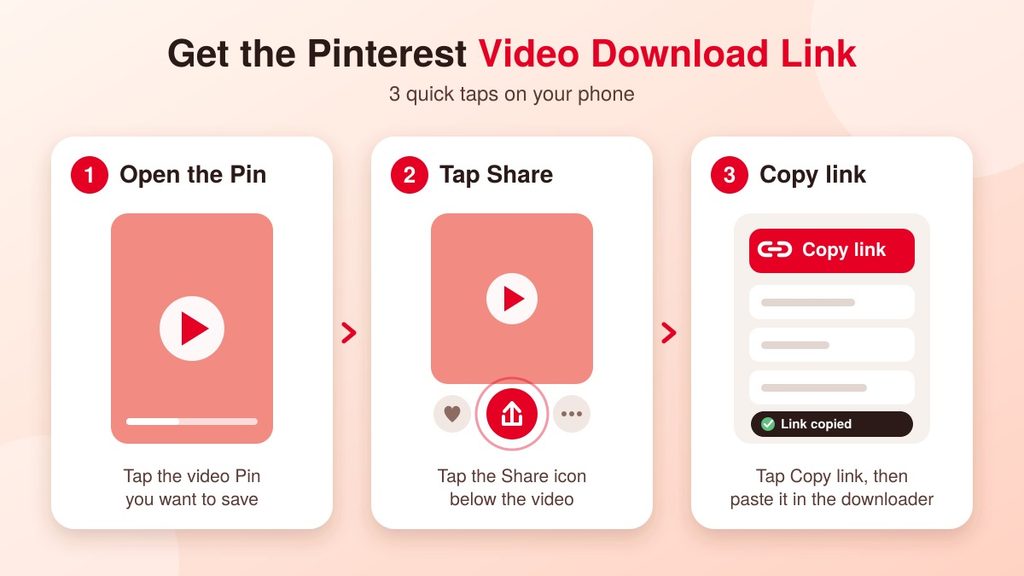
You must have a link to a video before you can save it. This is the most crucial step because a downloader tool uses this link to find the correct video. Fortunately, it only takes a few seconds.
On your phone (Android or iPhone):
- Open the Pinterest app and tap the video Pin.
- Tap the Share icon.
- Tap Copy link.
On your computer:
- Open the video Pin and let it load on its own page.
- Copy the whole address from your browser’s address bar. You can also use the Share button and select the Copy link.
Your Pinterest video download link will look like pinterest.com/pin/ followed by a very long number, or it will be a short link beginning with pin.it. Both typically work with downloaders. But be sure to copy the link of the single Pin, not your home feed or a search page.
Pinterest Video Downloader HD: How to Save Videos
Unfortunately, Pinterest doesn’t feature a download button on every video Pin. Depending on the Pin and your app version, you might see a Download option in the Share menu. If you do, tap it and the video will be added directly to your gallery. If you don’t, an online Pinterest video downloader HD tool can come to the rescue.
Folks save Pinterest videos for a variety of reasons: following a recipe in the kitchen without buffering, saving a craft or workout video to watch offline, or saving ideas for a project when the internet is slow.
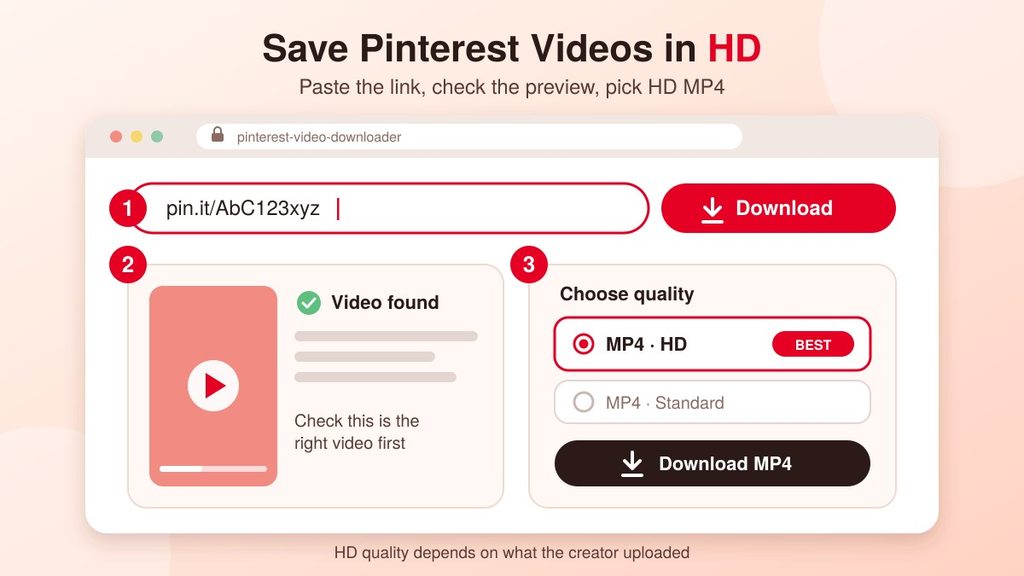
This is the typical procedure:
- Locate the Pinterest video download link (as shown above) and copy it.
- Open a Pinterest video downloader website in your phone or computer browser.
- Paste the link in the box and then hit Download or Search.
- Check the preview to make sure it’s the right video.
- Choose the HD or highest quality MP4 option and tap Download.
- On Android and computers, find the file in the Downloads folder, and on iPhone in the Files app.
One honest point about HD: a downloader can’t make a blurry video sharp. It can only extract the best quality which the creator uploaded. If a video is low quality on Pinterest then the saved file will be the same quality.
On a smartphone, the saved video will typically be in your gallery or Downloads folder. On a laptop, rename the file right away so it will be easy to find later.
How to Choose a Safe Downloader
There are lots of downloader websites available, and not all of them are good ones. Be cautious with these basic guidelines:
- Never enter your Pinterest password. A downloader only needs the link.
- Don’t visit sites that require installation of an app or extension.
- Do not click on fake, bright “Download” buttons that are actually ads. The real button will typically appear after the preview.
- If a site keeps opening pop-ups, close it and go to another site.
Is It Okay to Download Pinterest Videos?
Most people save a video for personal use, such as a cooking tutorial that can be watched without an internet connection. However, please note that each video is the property of its creator. When posting it on your own page or website, please request permission and make sure to credit the source properly. Private and deleted Pins can’t be downloaded at all.
Pinterest Video Download Not Working? Try These Fixes
Don’t worry if a downloader shows an error. There is an easy solution to most of the problems:
- Make sure you copied the link of one single Pin, not a feed or search page.
- Make sure the Pin is public. Private or deleted Pins won’t load.
- Refresh the page and paste the link again.
- Switch to a different browser, or switch between mobile data and WiFi.
- If it fails on one site, try another downloader.
Simple Tips to Get More From Pinterest
Create separate boards for different plans, such as travel, study and fashion, and label them clearly so that you can find things easily. Save regularly, because the more you save, the better Pinterest will understand your taste. Once a month, clean up your boards and remove pins you no longer need. Small habits like this help keep your account tidy and your feed full of content you actually want to see. Also, if you use a Pinterest video downloader HD tool, only save the videos you really need so you don’t fill up your phone storage.
How I Discovered Pinterest
When i started my website then i knew about Pinterest and explored about Pinterest like how it works and how it is helpful for my website. After that i create a Pinterest account for my website
and upload posts related to my articles and then after some days I get some reach and engagement on my Pinterest page.
Throughout that page I get some traffic on my website which helps me a lot or pushes me towards hard work. In the starting phase the reach is between 500 to 1000 but day by day it goes upwards like 10,000 to 20,000. People really started liking my content.
But today my reach is a bit lower because I didn’t post consistently because of my personal work. Consistency is a very important step on Pinterest if you really want good reach.
I also found that Pinterest is not only for traffic. Some people use it to promote and sell their products, and some people even earn a commission through affiliate links. I haven’t explored that side much yet, but I can clearly see the potential. Overall, Pinterest is a really good platform, if you are just starting out.
Conclusion
Now you know how to use Pinterest from start to finish: creating an account, saving Pins, using Lens and even making your own Pins. You also know how to get a Pinterest video download link and how to download videos in great quality using a Pinterest video downloader HD tool, safely and respectfully.
Open Pinterest today, make your first board and follow the steps above! Once you begin, you’ll understand why it is a popular tool for people of all ages to use every day.
Leave a Reply